
Affiliate Program in TimeFlow
Earn commission when people you refer sign up through your link and subscribe to TimeFlow.
Updated · Getting started & account
On this page
Before you start
No special permission beyond being logged in.
Finding this in the UI
- Header → profile menu (your avatar) → Affiliate Program, or go directly to
/dashboard/affiliate. Not in the sidebar or footer.
Setting up your affiliate profile
The first time you open it, complete Join Our Affiliate Program: "Create your affiliate account to start earning commissions. You'll receive a unique referral code to share with friends and earn up to 20% commission on their subscriptions." A "What you'll get" checklist spells out the specifics: a unique 8-character referral code, up to 20% commission on referred subscriptions, real-time tracking of clicks and conversions, and a minimum payout of R50.
Choose a Payment Method:
- Bank Transfer — Account Holder Name*, Bank Name*, Branch Code*, Account Number*.
- PayPal (PayPal email).
Click Create Affiliate Account to finish setup — a toast confirms "Affiliate profile created successfully!" and takes you straight to the dashboard.
Your dashboard
Once your profile exists, you'll see:
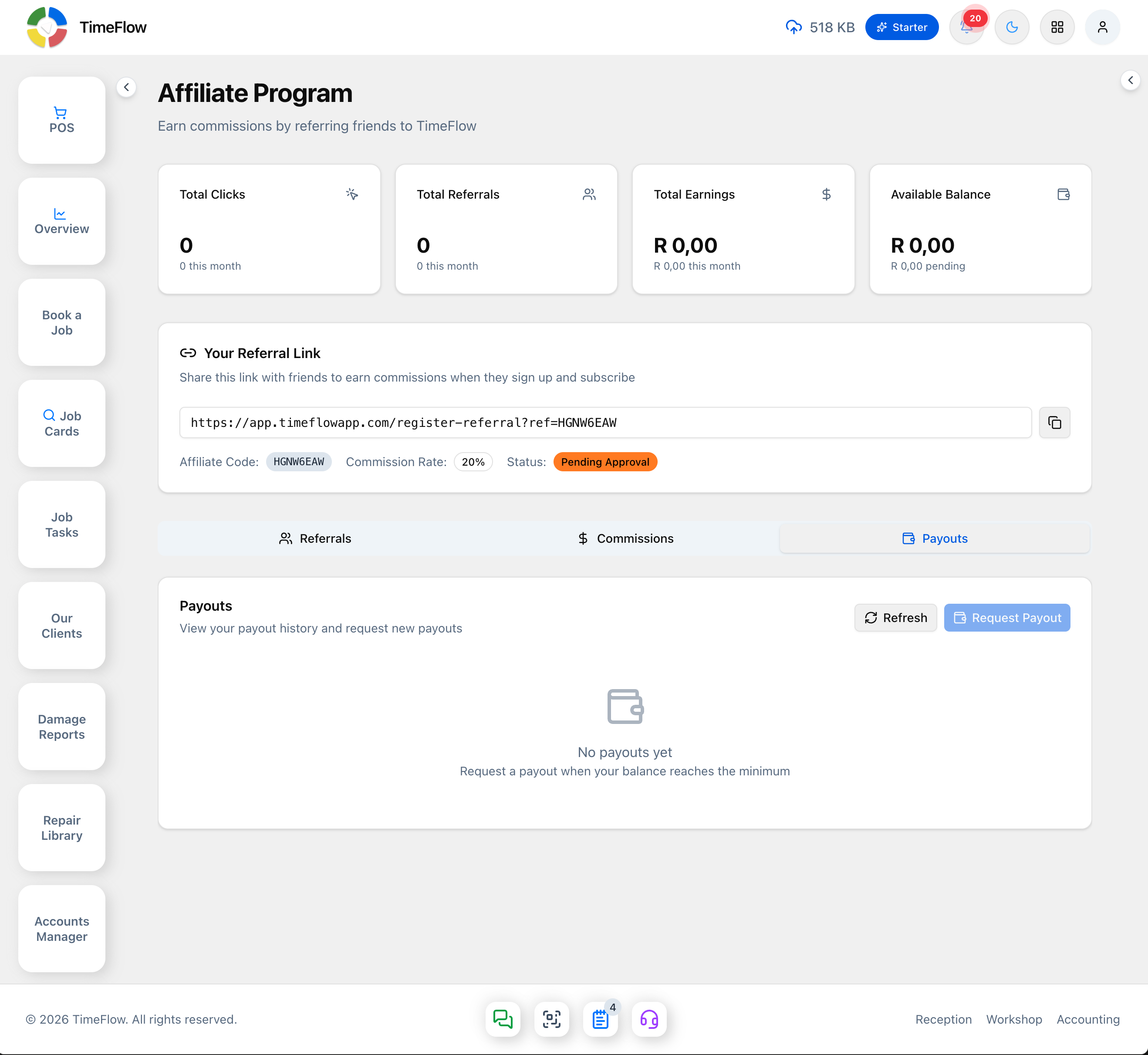
- Stat cards for Total Clicks, Total Referrals, Total Earnings (in ZAR), and Available Balance, each with this month's figure underneath. A Conversion Rate card appears once your rate is above zero.
- Your Referral Link ("Share this link with friends to earn commissions when they sign up and subscribe") — copy it with the copy button (built as
/register-referral?ref=<your code>), plus your Affiliate Code, Commission Rate (e.g. 20%), and Status (e.g. Pending Approval, shown as a badge, or Active).
Tracking referrals, commissions, and payouts
- Referrals tab — everyone who signed up with your link: referred user, email, total commission from them, commission count, and join date.
- Commissions tab — one row per commission (created when a referral subscribes): referred user, amount (ZAR), status (pending, approved, paid, rejected), and date.
- Payouts tab — your payout history: amount, method, status (pending, processing, completed, failed), requested date, and paid date.
Use Refresh on any tab to pull the latest data.
Requesting a payout
Once your Available Balance reaches your account's minimum payout threshold (R50), click Request Payout in the Payouts tab ("View your payout history and request new payouts"). Below the minimum, the empty state simply reads "Request a payout when your balance reaches the minimum" rather than letting the request through.
Tips
- Share your referral link directly rather than the plain sign-up page — only referral-link sign-ups get tracked to your account.
- Amounts throughout the affiliate dashboard are shown in ZAR.
Frequently asked questions
How much commission does the TimeFlow affiliate program pay?
Up to 20% commission on the subscriptions of people who sign up through your referral link and subscribe.
What is the minimum affiliate payout?
R50. Once your available balance reaches the minimum, click Request Payout on the Payouts tab. Payouts go to a bank account or PayPal.
Related guides
- Subscription & billingView your TimeFlow plan, switch between Starter and Professional, update your payment card via PayFast, and download invoices from your payment history.
- Signing up & logging inCreate a TimeFlow account, verify your email, set up your company, first branch and team, log in, and complete your profile — step by step.