
Cash-Up in TimeFlow
Reconcile a day's takings by tender type, staff member, and branch — with expected cash on hand and a downloadable PDF.
Updated · Sales, invoicing & POS
Before you start
You need accounting permission.
Finding this in the UI
- Header → Tools menu (grid icon) → Cash-Up.
- Cash-Up is not on the left sidebar or footer — it only opens from the header's Tools menu.
Running a cash-up
In the Cash-Up dialog, set:
- From / To dates for the period you're reconciling.
- Branch — a specific branch, or "All branches".
Click Generate to pull the report. Below the filters, a summary line shows the company, branch scope, date, and timezone (e.g. "Main Street Repairs · All branches · 2026-09-16 · Africa/Johannesburg"), and you'll see:
- Expected cash on hand — what your till should contain based on recorded transactions.
- Tender breakdown — a table of every payment method (cash, card, EFT, etc.) with count, cash in, cash out, and net. When there's no activity in the selected period it reads "No tender activity for this period" instead of an empty table.
- Four summary cards: Gross sales (with order count), Refunds (with refund count), Net sales, and Takings net (with payment count).
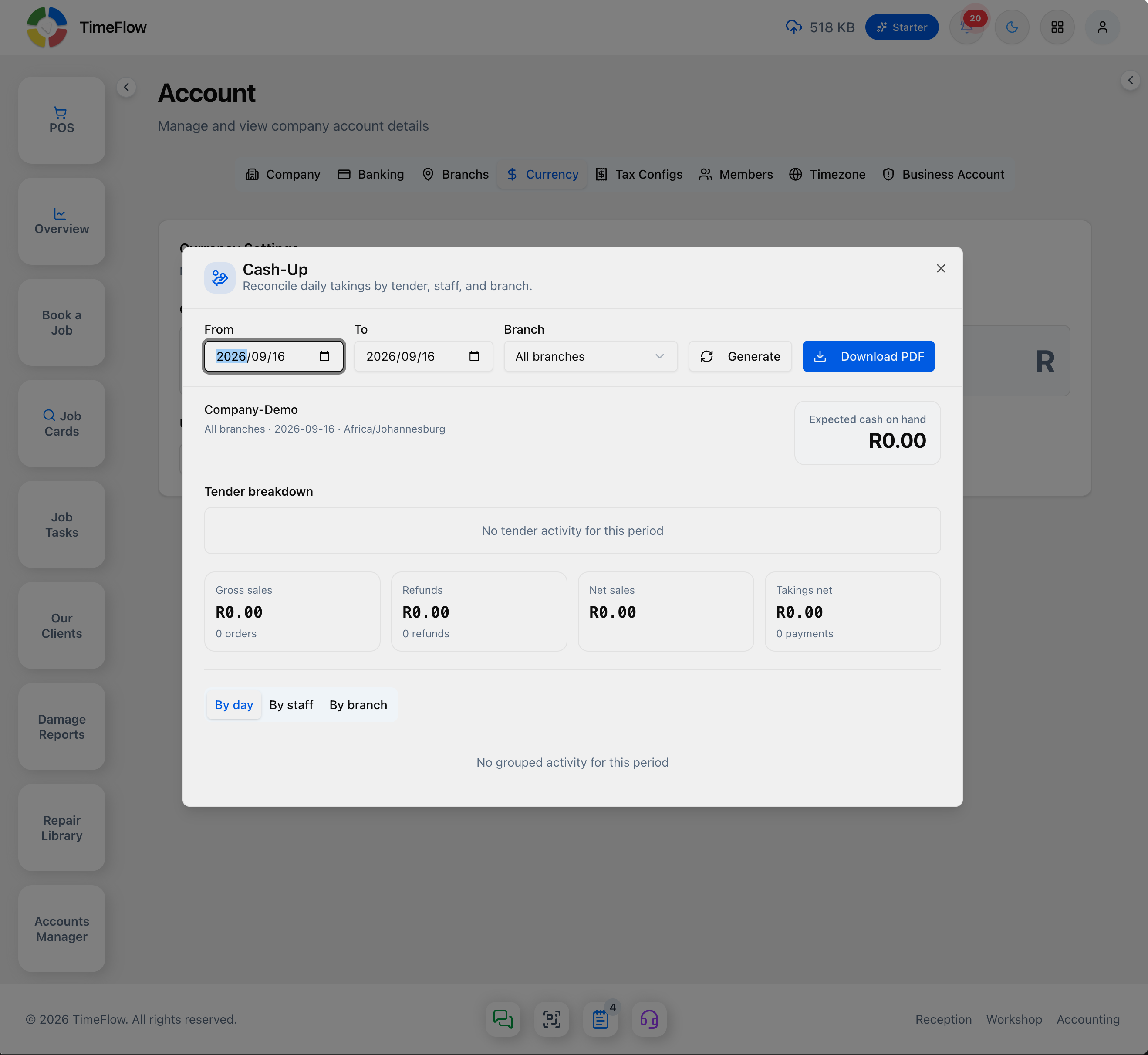
Use the By day / By staff / By branch tabs to break the same totals down differently, then Download PDF to keep a signed-off copy for the till reconciliation.
Tips
- Run Cash-Up at the end of every shift or day before banking takings, so any mismatch between expected and actual cash on hand is caught early.
- Filtering by branch only matters if your company has more than one branch configured.
- If a date range shows "No tender activity for this period" but you know sales happened, double-check the From/To dates and Branch filter before assuming something's wrong with the data.
Frequently asked questions
How do I do a cash-up in TimeFlow?
Open the header's Tools menu → Cash-Up, pick the date range and branch, and click Generate. You'll see expected cash on hand, a tender breakdown, and sales totals, and can download a PDF.
Related guides
- Point of sale (POS)Sell accessories and devices at the counter with TimeFlow POS: barcode and IMEI scanning, held orders, discounts, and cash, card, EFT and other payments.
- Payments & depositsTake an up-front deposit on a repair job card, record and allocate payments against invoices, and capture or search payments for any client account.
- Analytics dashboardOne dashboard for your whole repair business: job cards, revenue, pending invoices, quote conversion, growth versus last month, and overdue items.