
Credit Notes in TimeFlow
Document a reduction to what a customer owes — returns, corrections, or discounts — optionally linked to the original sales invoice.
Updated · Sales, invoicing & POS
On this page
Before you start
You need accounting permission.
Finding this in the UI
- Left sidebar → Accounts Manager, then Credit Notes, or go directly to
/dashboard/accounting/credit-notes.
Creating a credit note
Click Add Credit Note (/dashboard/accounting/credit-notes/add) — the credit note number is suggested from your last one (editable).
- Select the original invoice to copy the client, account, order, currency, and invoice lines across — once selected you'll also see Invoice total, Already credited, and Remaining after this credit summary figures. Lines land in a table below (Description/Qty/Unit price/Tax/Net/Tax amt/Gross, each editable via a pencil icon or removable). Use the Add a line row above it (Description, Qty, Unit price, Tax category, Tax %, then + Add line) for a line not on the invoice, or to credit without linking an invoice at all. Totals always follow the lines.
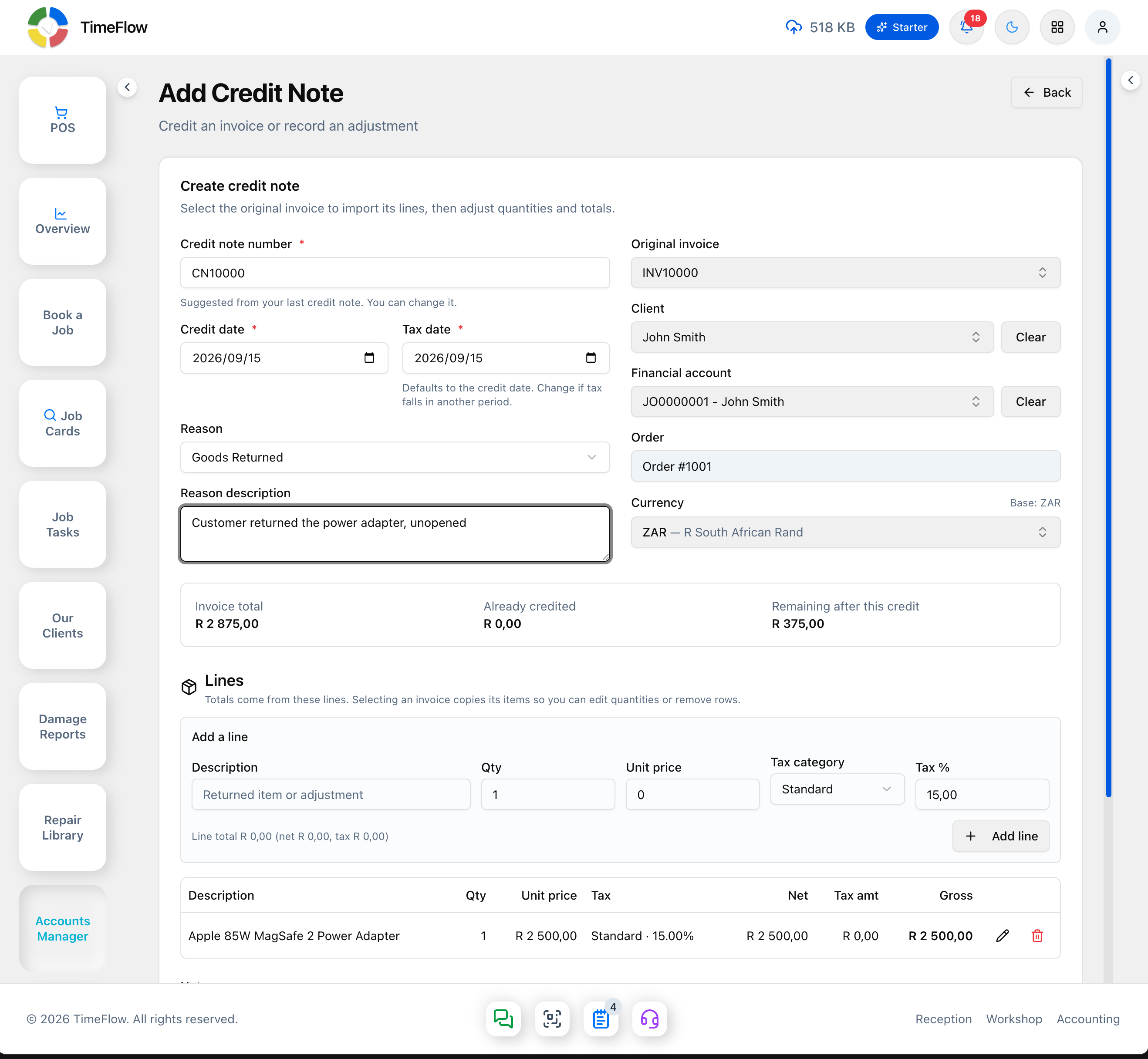
- Choose a reason — Goods Returned, Defective Goods, Overcharge Correction, Order Cancelled, Discount Applied, Price Adjustment, Service Issue, or Other — and add a description (required if the reason is "Other"). Tax date defaults to the credit date.
- Add notes (shown on the credit note PDF), then click Create credit note to save as Draft.
Moving it forward
- Draft notes can be Issued or deleted.
- Issued notes can be Applied to the invoice.
- Issued and Applied notes can't be deleted from the UI.
- Download PDF or Print from a row or the detail page — the PDF is a credit document (status stamp, invoice reference, tax by line, CR total) without banking details.
Finding credit notes
The list opens with four summary cards — Outstanding (ZAR) (issued, not yet applied), Applied (ZAR), Drafts waiting, and Cancelled — then Filters: period presets (Today/Last 7 Days/Last 30 Days/This Month/Last Month/This Year/All Time), status chips (All/Draft/Issued/Applied/Cancelled, each showing a live count), a search box (by number, client, or invoice), a sort dropdown, and Clear Filters.
Tips
- A credit note's detail page shows other credits already applied to the same invoice, so you can see the full impact at a glance.
- Tax report summaries elsewhere in Accounting can include credit note breakdowns for statutory filing.
Frequently asked questions
What's the difference between an issued and applied credit note?
An issued credit note is finalised but not yet used against an invoice. An applied credit note has been used to reduce the invoice it relates to.
Related guides
- InvoicesCreate repair invoices for parts and labour with per-line VAT and discounts, link job cards and insurance claims, take payments, and post to the ledger.
- Client statementsGenerate a customer statement of open invoices, credits, and unapplied payments, with 30/60/90/120+ day aging and a downloadable PDF.
- VAT settings & tax reportsConfigure VAT (e.g. South Africa's 15%) with registration, rates, and reporting period, then review output and input tax entries and tax periods.