
Multi-Currency in TimeFlow
How TimeFlow handles foreign-currency documents against your company's base currency.
Updated · Accounting & VAT
Before you start
You need accounting or company account permission depending on what you're changing.
Finding this in the UI
- Your company base currency is set at Header → profile menu → Company Account, then the Currency tab (one of the tabs alongside Company, Banking, Branches, Tax Configs, Members, Timezone, and Business Account).
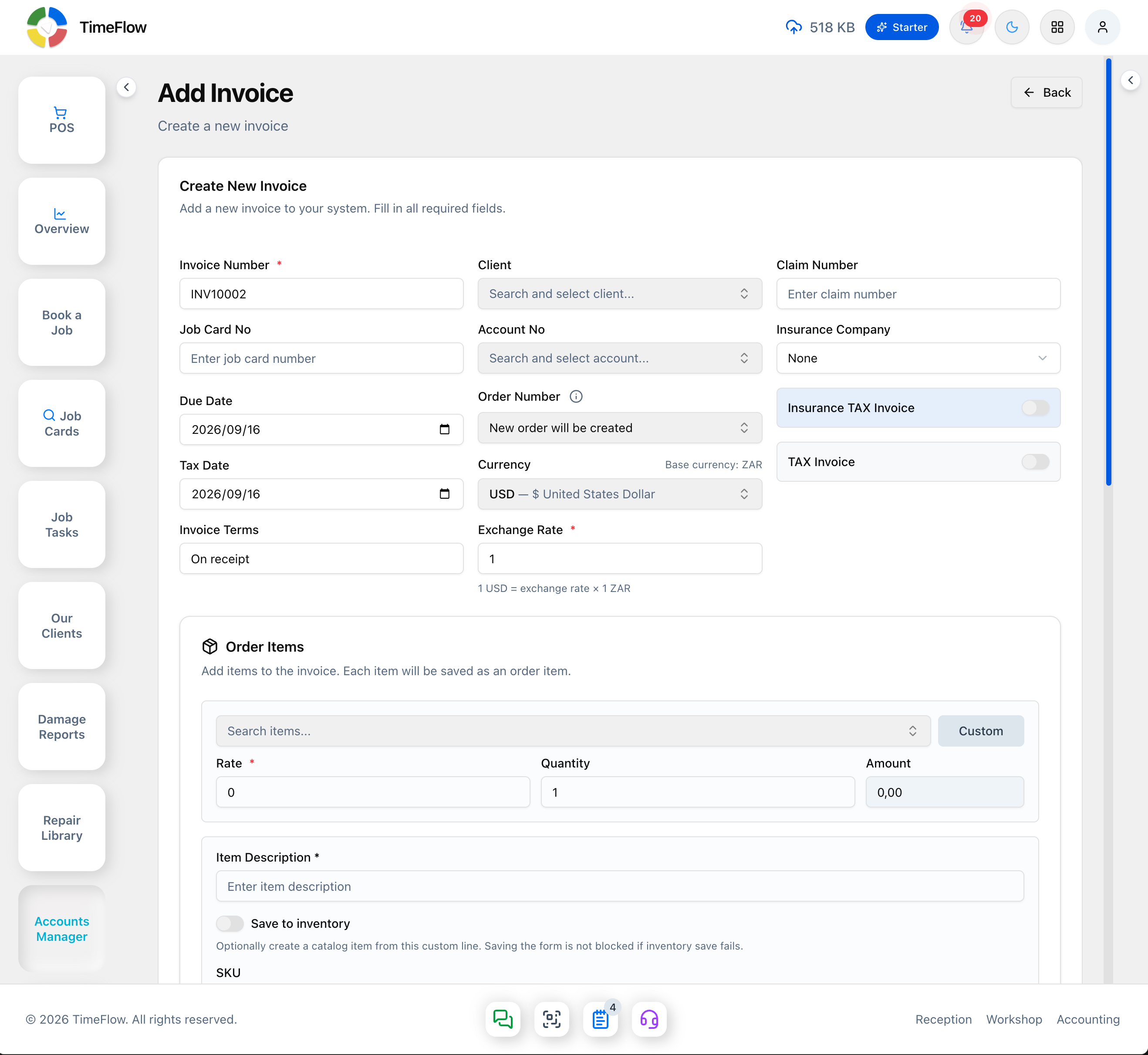
- Currency is then chosen per-document on Invoices, Quotations, Purchase Orders, Purchase Invoices, and Credit Notes when you create or edit one (all reached from Left sidebar → Accounts Manager).
How it works
- The Currency tab shows your Current Company Currency (e.g. ZAR) as a read-only card, plus an Update Company Currency dropdown to change it.
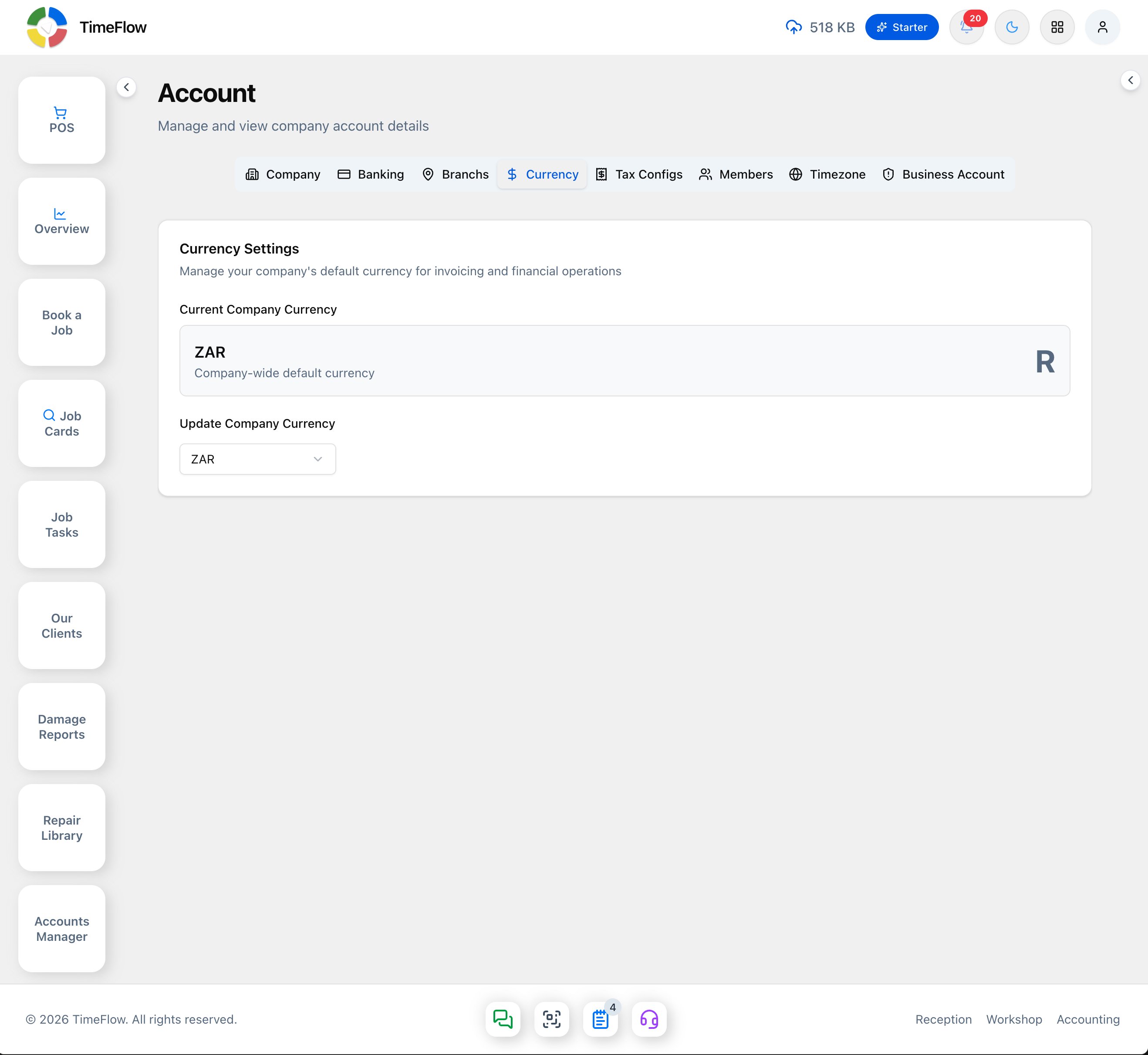
- Base currency is what your reports, dashboards, trial balance, financial statements, and aging totals are always shown in — so figures from different documents can be safely added together.
- Document currency is whatever's printed on one specific invoice, quotation, PO, purchase invoice, or credit note — line totals, PDFs, and receipts use that document's own symbol (e.g. $ on a USD invoice) even if your company base is ZAR. The invoice list itself has a Currency column so you can see each document's currency at a glance.
- On a document's create/edit form, the Currency field defaults to your base currency and shows a "Base currency: ZAR" hint beside it. Pick a different currency and an Exchange Rate* field appears in its place, with a helper line spelling out the conversion (e.g. "1 USD = exchange rate × 1 ZAR") — the rate is the multiplier that converts the document's amounts into your base currency. Payments and deposits against that invoice should use the same document currency.
- Overview, Insights, and financial widgets aggregate everything in base currency (often labelled, e.g. "Total Sales (ZAR)") — foreign documents are converted first, so don't expect to manually add amounts across currencies.
- The Aging Report shows bucket totals in base currency, but each line can also show the original document balance and currency.
- General Ledger journal detail shows currency, FX rate, and base debit/credit for lines posted from a foreign document.
- POS checkout defaults to your base currency; foreign-currency sales go through Accounting invoices instead.
Tips
- Confirm your base currency once, early — it drives every consolidated report in the system.
- CSV/PDF exports show document currency on transactional rows, with cross-document summaries labelled as base currency.
Frequently asked questions
Can I invoice a customer in USD if my base currency is ZAR?
Yes. Pick USD on the invoice and enter an exchange rate. The document prints in USD while reports convert it to your base currency.
Related guides
- InvoicesCreate repair invoices for parts and labour with per-line VAT and discounts, link job cards and insurance claims, take payments, and post to the ledger.
- Company accountManage your repair shop's company details, banking, branches, currency, VAT settings, team members and permissions, and timezone from the Company Account page.
- General ledgerDouble-entry books for your repair shop: chart of accounts, automatic journal posting from invoices and payments, period locking, and trial balance.