
Financial Accounts (Customers Accounts) in TimeFlow
Set up the per-client account that invoices, quotations, deposits, and payments all post against.
Updated · Sales, invoicing & POS
Before you start
You need financial account or accounting permission.
Finding this in the UI
- Left sidebar → Accounts Manager → Customers Accounts, or go directly to
/dashboard/accounting/financial-accounts. - The header and footer do not have direct links here.
Creating an account
Click Add Customers Account and fill in:
- Account Number* — a unique identifier for this account.
- Client — search and select an existing client, or choose Add new client at the top of the results to open an inline mini-form (Name*, Email, Phone*, Alt. Phone, Address, VAT Number) and Save client without leaving this dialog.
- Insurance (Optional) — link the account to an insurance company if this client's work is billed through insurance, or leave as "None".
A validation note — "At least one of client or insurance is required" — shows until you've picked one or the other (you don't strictly need both).
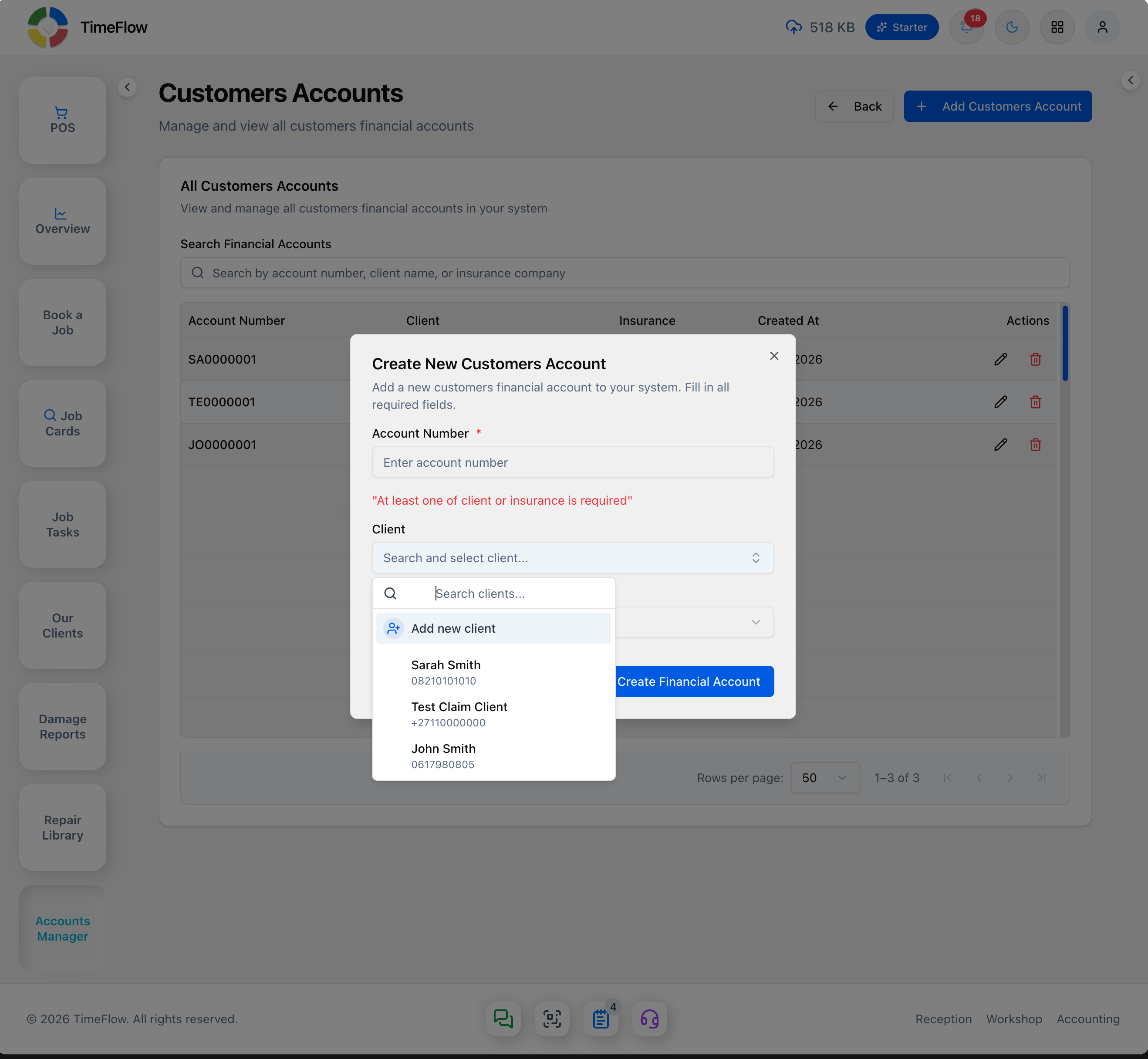
Click Create Financial Account to save. Click the pencil icon on an existing row to Edit it, or the trash icon to Delete one (with a confirmation dialog).
Heads up: saving a client through the inline Add new client form creates their financial account immediately, with an account number auto-generated from their initials (e.g. "Sarah Mokoena" → SA0000001) — it doesn't wait for you to also fill in and submit the Account Number field above. If you then close the dialog without clicking Create Financial Account, no duplicate account is created; the auto-generated one is already there.
Tips
- Every client needs a financial account before you can invoice them, take a deposit, or generate a statement for them — set one up as soon as you onboard a new client (see Managing Clients).
- Linking an insurance company here is what lets insurance-billed invoices and claims flow through the same account (see Insurance Claims).
Frequently asked questions
Does every client need a financial account?
Yes — a client needs a financial account before you can invoice them, take a deposit, or generate a statement.
Related guides
- Managing clientsKeep a customer database for your repair shop: add and edit clients and insurance companies, record SMS/WhatsApp consent, and reuse details when booking.
- InvoicesCreate repair invoices for parts and labour with per-line VAT and discounts, link job cards and insurance claims, take payments, and post to the ledger.
- Client statementsGenerate a customer statement of open invoices, credits, and unapplied payments, with 30/60/90/120+ day aging and a downloadable PDF.